Introducing Print Maps
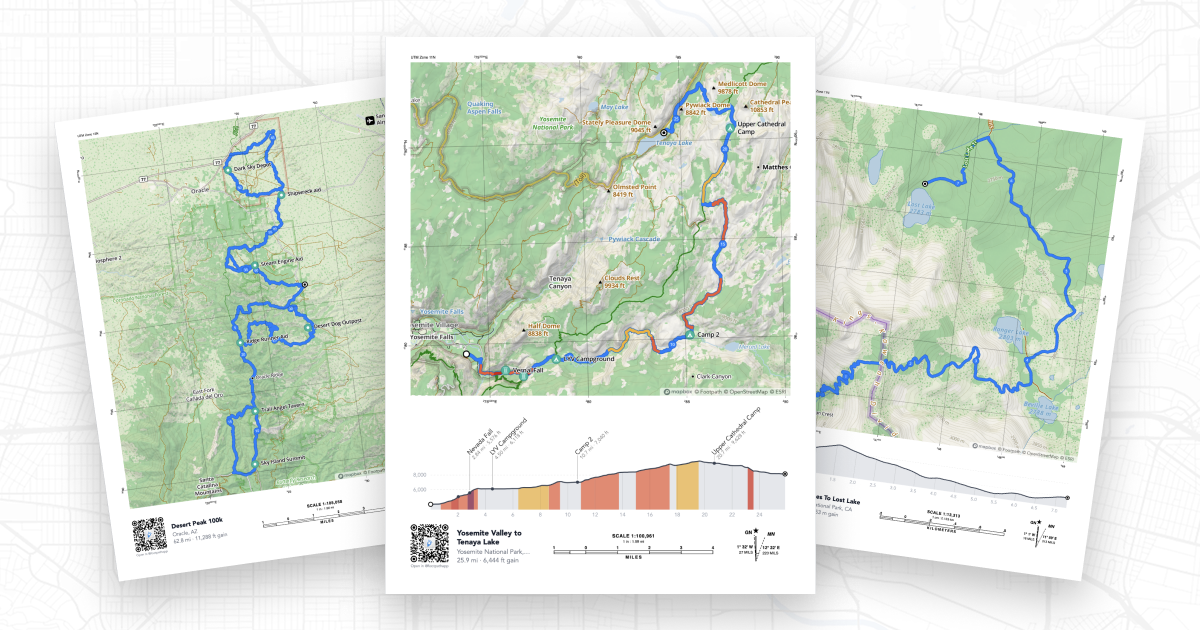
For serious adventurers, a good paper map is still an essential piece of kit, and today we’re making it easier than ever to create printed maps of your routes.
Introducing Print Maps, a new feature for Footpath Elite subscribers that lets you generate high-quality, print-ready PDF maps of any route in your library.
Beautiful maps, your way
Print Maps gives you full control over how your map looks. Choose your paper size (Letter, Legal, Tabloid, A4, or A3) and toggle between portrait and landscape orientation to best fit your route. A live preview updates in real time as you adjust settings, so you always know exactly what you’ll get before you print.

Every detail you need
A great paper map is more than just a picture. Every Footpath print includes options for:
- Elevation graph with optional color-coded climbs
- Scale bars in both miles and kilometers
- Coordinate grid with your choice of DMS, Decimal, UTM, MGRS, or OSGB formats
- Declination diagram so you can accurately use a compass
- QR code that links back to the full digital route in Footpath

How to use it
Print Maps is available to Footpath Elite subscribers for any route, just open your route in the web app and look for the print icon in the upper right.
From there, customize your print settings and click Open as PDF to view and download or print your PDF.
The best backup you can have
GPS devices are incredible, but paper doesn’t fail. Whether you’re heading into the backcountry, racing an ultra, or just want a beautiful memento of a big adventure, Print Maps gives you a reliable, beautiful backup that you can fold up and slip into your pack.
Upgrade to Footpath Elite and start printing your maps today.